Cross-reference Print: add the source document

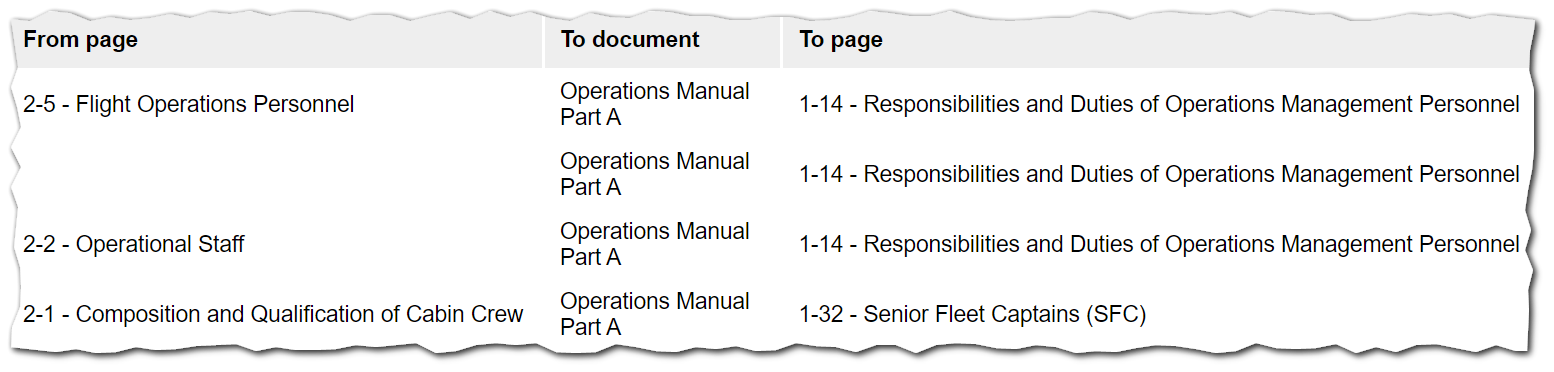
When we revise a certain manual, we also want to communicate other editors about the impact of outdated cross-references in their documents. From WM Monitor > Corss-references, we can filter the "TO this document" list by outdated cross-references, print it as a PDF and then send it to the affected editors. However, the PDF does not show the source document (see screenshot below); it only presents the "From page" column, which makes the PDF not very useful in the end.
Could that be improved by adding the "From" document?
0
Comments
Also, what about if the printed PDF could carry the red colour for the manual? Just a thought.
Great improvement Bruno Quadros Rodrigues,
We agree that there should be a line mentioning the source manual. Here is the improvement ticket number: MANUALS-7198. For the red color, as it is not the permanent state of this link, we will not be carrying out the color once exported.
Thank you for your great ideas!
Please sign in to leave a comment.