Pilots meet Pilots on Webmanuals

Hi Team,
wouldn't it be great, if the Webmanuals profiles would be a lot more open and inviting almost like in social media?
I think general functions like the following would be cool. Nothing very important but cool! :)
- Users can add a profile picture;
- Users can see other users and find out about their roles or user types;
- Users can send other users messages within the webmanuals system (app and browser);
- Users can filter other users e.g. in order to find out who else is flying the same airplane type or similar;
- Profiles get more personalized and it would maybe encourage to use webmanuals more often;
- When editors have questions about a change request, they can send a message directly to the user instead via e-mail;
- Users can have an overview of their change requests and/or comments;
- A module can be created, that shows all Webmanuals Users as an overview for everyone.
Especially for new personnel it would be much more helpful in oder to get to know the other people in the organisation.
Here is an Idea on how it could look like:
User Profiles:

Overview filtered by Airplane Type:
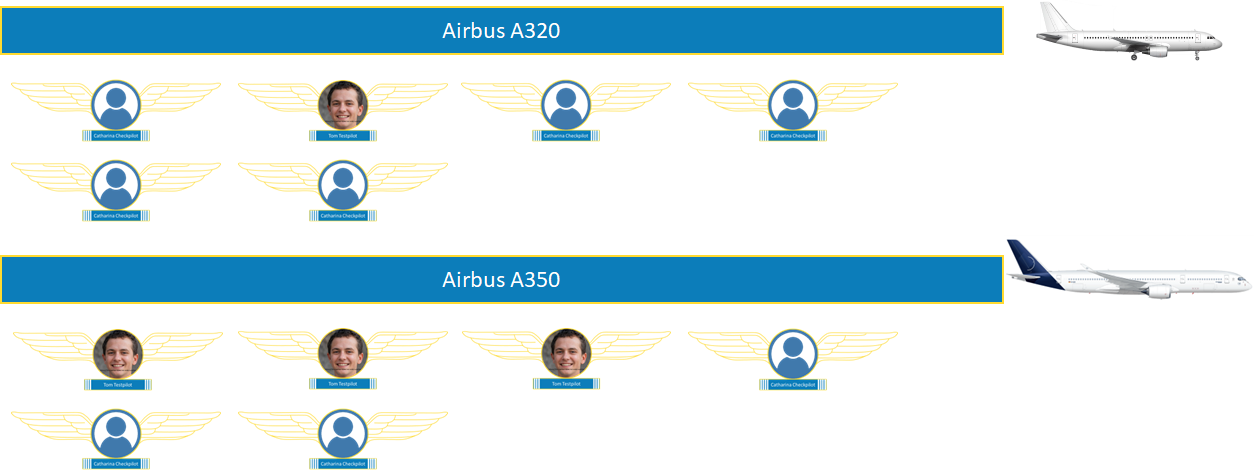
Very curious what you think about it!
Best,
Mat
0
Comments
Hi Matthias,
I think there are thinking out of the box and there are thinking out of the building :)
That said, I like the thought of WM adding to tying the employees together.
- I like this one and I think it would be beneficial especially with the new icons for who else is working on the document
- This we will need to discuss internally, I am not sure everyone want full transparency on role structures
- Could be a cool expansion to the increased cooperation I want for the editor.
- This is really cool, I am afraid it might be a bit out of scope, but I like the thought and appreciate the graphics, and for that I will discuss it internally.
- I agree, and if we can add something extra like the wings you suggested or let the user select personally we could have something fun and engaging
- Yup this is exactly the thing that I have in the books for improved editing and collaboration.
- Yup This is a clear thing we want to build
- I do not understand why we would like to have a list of all WM users in a list in a document - help me.
As always Matt, thank you for your excellent, structured and graphically supported feedback <3
Kind regards
Stefan
Hello Stefan,
thank you so much for your detailed feedback. It feels good, that my ideas reach you and that you take the time to look at them.
I think in this case, you left no questions on my side. One thing I wanted to explain is in regards of the last bullet point.
"A module can be created, that shows all Webmanuals Users as an overview for everyone."
What I mean, is that it would be cool if a pilot can see all other pilots and perhaps also the people from the office on one graphic or similar. It gives an employee the opportunity to see the people that work in the same organisation and to learn what the function of each is. There is two ways to do that:
Employees are sorted e.g. by the type of airplanes they fly or by the department they belong to. So if I want to know who is flying the LJ60 fleet, I can go there and see in one go all the faces that fly the LJ60. Or I want to know who is working for the compliance department, I can see that too.
Perhaps I can then simply click on one of the faces and write a message to them directly.
Under the profile of each employee could be the information of this person and what he is doing.
e.g.
Anton Aileron
Commander on LJ60
FO on A320
reader
or
Laura Luft
Manager Compliance
Internal Reviewer
Hope this answers your question. :)
As always, stay safe and see you in September.
Best,
Mat
Please sign in to leave a comment.