Overflow of compliance connections shown

Headings connected to compliance library can be made visual. Normally the regulation and number appears as a grayish watermark under the heading. In many cases not only one implementing rule and one AMC might apply to a heading, but several. Also it might be that the complete regulation including all AMCs apply to the header. When connecting several regulations to one header, this might lead to the situation where the grayish shown regulations shifts underneath the actual manual text.
Idea1: The spacing between the Heading and the text should adopt automatically so that the regulation and the manual content do not overlap
Idea2: In the compliance library it would be helpful if the user can select/ define that only the implementing rules are shown as grayish watermark and the AMCs and GMs not. Currently one can only select the function show or not show :-)
Comments
HI Kruschat, Alexander,
We have received this request from other customers as well. I sent you a ticket with the improvement number so we can inform you if it gets implemented. Thank you for your contribution :)
Great topic.
This was one of the first things I noticed during our WM implementation. In general, because we're using the IQSMS-connector to conduc audits, I don't find displaying regulations unders chaper headings very useful anymore.
Adding a another idea for evaluation:
Idea 3: an option to pop-up the regulations content on screen upon hovering the mouse pointer over chapter headings.
Dear WebManuals Team,
I may have missed an update on how to resolve the issue described above, but I recently noticed that in several manuals, the text is still difficult to read due to grey text caused by linking that covers it.
While I understand that these links can be made invisible (not available) for readers, our authorities and editors prefer to see them during reviews. However, they should still be able to read the entire text, which is currently obscured by the grey regulation references.
Is there anything in the pipeline to address this issue?
Thank you very much for your assistance.
Best regards
Good evening dear WebManuals Team
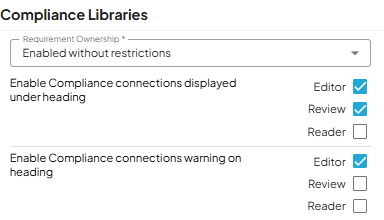
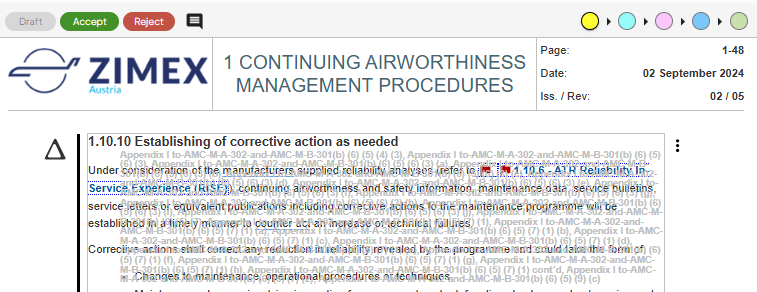
We have the compliance connection deactivated for readers and for the CAA review we are adding a pdf file to allow reading manuals without being disturbed by the overflow.
However it still effects our editors and can make working on the manuals annoying, because it is impossible to select text behind the overflow.
Is there any solution for this or an improvement planned for it?
Thank you for your much appreciated help.
Best Regards
Dear Fionn,
Thank you for your comment,
We released a new version last week so that you can now view longer compliance links by hovering over the regulation:
If you are interested in other improvements added in our summer release feel free to take a look at Web Manuals Release notes 2025.8.0 and Web Manuals Release notes 2025.8.0 Webinar!
Good morning Virginie,
I was looking for a post about longer compliance links not overflowing into further lines. Whilst it's true that in webmanuals the full paragraph can be seen by hovering over the regulation, the same is not happening when the document is exported to a PDF. Is there a workaround for that?
Thank you!
Please sign in to leave a comment.